
My PlayHome Stores
Shimon Young : Play Home SoftwareCasual
4.2464.00 Reviews
- Version
- 2.9.5.48
- Installs
- 100.00K
- Age Rating
- Everyone
Screenshots

Our Review of My PlayHome Stores
 Analysis by Appyee
When I’m choosing a pretend-play game, I first ask whether it gives a child room to invent a scene or keeps nudging them toward a set goal. My PlayHome Stores is firmly on the open-ended side: its appeal is in arranging people and everyday activities, not in winning levels or collecting rewards. That makes it a better fit for relaxed, imaginative play than for someone looking for a challenge-driven casual game.
What I would look for before choosing it
I’d consider who will be playing, how they like to play, and whether they already enjoy the My PlayHome world. The store setting gives children familiar prompts—choosing clothes, getting a treat, or handling groceries—without requiring them to follow a fixed script. A child who likes making up conversations and moving characters around can get more from that freedom than one who wants instructions, timed tasks, or a clear finish line.
It is also useful to think about how the game will be used in a real household. For a short, quiet stretch while a parent prepares dinner, the simple touch-and-drag style is approachable: a child can start a small shopping story without first learning complicated controls. For a longer play session, the experience depends more on the child’s imagination than on a sequence of new objectives, so it may suit some children better than others.
Why the shop setting works
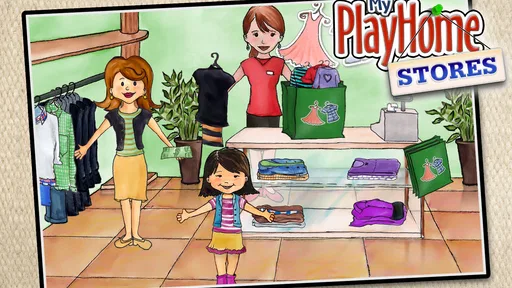
The setting gives pretend play a practical shape. Rather than beginning with a blank screen, a child can start from a recognizable errand and build a story around it: someone picks an outfit, another person waits, then the group heads to the grocery store. I like that this can turn an ordinary routine into a little role-play scene without making the game feel like a lesson.
A useful way to keep play fresh is to give the characters different roles instead of repeating the same shopping trip. One can be choosing what to wear, another can be in a hurry, and someone else can be deciding what to bring home. The game’s open-ended approach leaves those choices to the player. That freedom is a strength, but it also means an adult who wants a guided activity may need to suggest a starting idea.
Where it fits among casual games
Compared with puzzle games and other casual titles built around levels, scores, or quick objectives, this is much less about testing a skill. I would choose a puzzle game for a child who enjoys solving a defined problem, and a more structured educational app for someone who needs clear instructions and a specific learning task. This one makes more sense when the goal is simply to act out a story.
It also differs from open-ended drawing apps: here, the play comes from placing characters in a shared setting and imagining what they are doing, rather than making a picture from scratch. That distinction matters. A child who loves character-based pretend play may find the shop scenes more inviting, while a child who prefers building or drawing might be happier with a creative tool centered on those activities.
My practical test would be to watch how a child responds to an unstructured scene. If they immediately start moving people between the stores and narrating what is happening, the format is likely a good match. If they keep asking what to do next, a game with explicit tasks may be less frustrating.
Exploring a Miniature World
From the moment I opened My PlayHome Stores, I was transported into a charming little world bustling with activity. The app is a part of the larger My PlayHome universe, and it fits right in with its sibling apps. Here, you have several stores to explore, each filled with interactive items and characters that make the experience feel surprisingly lifelike.
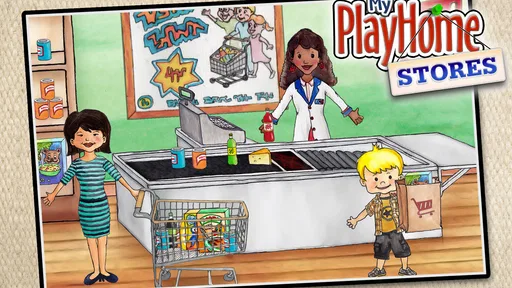
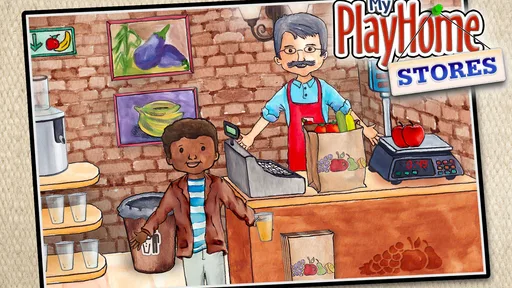
The graphics are vibrant and playful, making it perfect for kids and, honestly, quite enjoyable for adults too. Each store is designed with attention to detail, from the bustling grocery store to the cozy clothing boutique. You can tell the developers put a lot of thought into making each scene feel immersive and interactive.
Interactive Adventures Await
One of the coolest features of My PlayHome Stores is the sheer interactivity. You’re not just a passive observer; you get to interact with practically everything. Want to try on a new outfit? Go ahead! Feel like ringing up a customer at the register? You can do that too. The app encourages you to explore and play in any way you want, which is a refreshing change from more structured games.
And let’s talk about the characters. They’re adorable and diverse, each with their own quirky animations. You can drag and drop them around the stores, have them try on clothes, or even have them buy groceries. It's this level of interaction that makes the app feel alive and engaging.
Seamless Integration with the My PlayHome Series
One of the features I really appreciated was how My PlayHome Stores integrates with other apps in the series. If you already have other My PlayHome apps, you can blend them together seamlessly. This means you can take characters and items from one app to another, expanding your play options exponentially.
For families who already love the My PlayHome series, this interconnected playstyle is a massive plus. It keeps the content fresh and gives kids even more opportunities to engage in creative storytelling across different environments.
Making a little story last
For an everyday example, I’d set up a simple errand rather than trying to make the game supply a plot: a character visits the clothing shop, chooses an outfit, then goes on to pick up groceries. A child can decide who is shopping, what happens at the counter, and whether the trip goes smoothly or turns into a silly story. This kind of small, familiar scenario is easy to start and easy to stop when it is time to move on.
One small play tip is to let the child control the pace. If an adult moves characters and objects too quickly to demonstrate everything, the game can become a performance to watch instead of a story to create. I’d show one interaction, then leave room for the child to choose what happens next. For a child who enjoys talking through pretend situations, asking “Who is this for?” or “What should they do now?” can help without turning the session into a quiz.
The trade-off is that a familiar setting can also lead to repetition. If a child has already acted out many shopping trips, the next session may need a new premise to feel interesting. The game gives a stage, not an endless supply of written scenarios, so its longevity depends on how much the player enjoys inventing variations.
Encouraging Creativity and Imagination
My PlayHome Stores does an incredible job at fostering creativity. There’s no right or wrong way to play, which means kids (and curious adults) can let their imaginations run wild. Whether it’s setting up a pretend play date or organizing a shopping spree, the app provides a canvas for endless scenarios.
As someone who values creativity, I found this aspect particularly appealing. It’s not just a game; it’s a tool that can help develop storytelling skills and imaginative thinking.
User-Friendly Interface
The developers nailed it with a user-friendly interface that’s easy to navigate. Everything is intuitive, which is crucial for younger users. You simply tap and drag to interact with the environment, and there’s little to no learning curve.
This simplicity doesn’t detract from the depth of the app, though. It’s accessible yet rich, a balance that’s difficult to achieve but well-executed here.
Who may want a different kind of play
I would not pick this as the main game for a child who wants constant new goals, competitive play, or a clear sense of progress. There is no need to treat it as a substitute for every kind of casual game: its value is in imaginative role-play. A child who prefers puzzles, fast reactions, or guided lessons may be more engaged by a title designed around those aims.
It is also worth separating “easy to use” from “suitable for every age and situation.” The controls are simple, but a younger child may still benefit from an adult nearby at first, especially if they need help deciding what to do in an open-ended scene. The content rating is Everyone, and I see the gentle shop setting as approachable for family play, though a parent should still decide whether the format matches their child’s interests and routines.
Cost, compatibility, and choosing the right fit
The game is a paid casual title from Shimon Young : Play Home Software. It costs $3.49, has a 4.2 average from around 3.1K ratings, and has passed 100K installs. It first appeared on Nov 27, 2013; the current version is 2.9.5.48, and it requires Android 6.0 or later. Those details help set expectations: this is an established, focused play experience, not a free game built around a stream of short challenges.
Because it belongs to a wider series, I would decide whether the standalone shop play is enough before buying other titles for the sake of expanding it. If a family already has other My PlayHome apps, the ability to connect the worlds may be a meaningful reason to return to it. If not, the stores can still be enjoyable on their own, but the extra value of a shared play world will naturally matter less.
Switching from another game is straightforward in one sense: there is no complicated skill set to learn, and a child can begin exploring quickly. The bigger change is in expectations. A player coming from level-based games may initially look for goals that are not the point here. I’d explain that the fun is in deciding what the characters do, then give the child time to make the scene their own.
A Few Things to Consider
While My PlayHome Stores is a delightful app, it’s worth noting that it’s part of a larger ecosystem. To get the most out of it, having access to other My PlayHome apps can enhance the experience significantly. Additionally, it’s not a free app, so keep that in mind if you’re on a tight budget.
That said, the app doesn’t include any in-app purchases or ads, which is a huge plus in today’s app market. It’s a one-time purchase for endless fun, a rarity that parents will undoubtedly appreciate.
My recommendation
I’d recommend it to families looking for a calm, character-led pretend-play game, especially if their child enjoys inventing conversations and everyday stories. I’d be more cautious if the child needs a steady stream of prompts or if the household is choosing just one app for a child who prefers measurable challenges. In that case, a puzzle or task-based casual game may hold attention better.
In conclusion, My PlayHome Stores is a delightful addition to the My PlayHome series. It’s engaging, interactive, and, above all, fun. Whether you’re a parent looking for a safe and creative app for your child or a curious adult wanting to explore a miniature world, this app is worth checking out. So go ahead, dive into the colorful world of My PlayHome Stores, and let your imagination take the lead!
Verdict
Strengths of My PlayHome Stores
- Interactive and engaging for kids.
- No in-app purchases or ads.
- Easy navigation and controls.
- Promotes creative play.
- Vivid and colorful graphics.
Limitations of My PlayHome Stores
- Limited to certain store types.
- No multiplayer option available.
- May lack long-term appeal.
- Requires storage space.
- Not educational-focused.
Other Releases by Shimon Young : Play Home Software
View All
My PlayHome
Casual4.1
Similar Picks in This Category
View All
My Talking Angela
Outfit7 Limited4.2

My Talking Tom
Outfit7 Limited4.3

Pou
Zakeh4.2

My Talking Tom 2: Pet Game
Outfit7 Limited4.3

Candy Crush Saga
King4.6

Bridge Race
Supersonic Studios LTD4.1
Frequently Asked Questions
What is the main purpose of My PlayHome Stores?
My PlayHome Stores is an interactive app designed for children to explore and engage with various virtual stores in a playful environment. It encourages creativity and imaginative play by allowing kids to interact with different store elements, customers, and products, thereby enhancing their decision-making and social skills.
Is My PlayHome Stores suitable for all age groups?
My PlayHome Stores is primarily designed for children aged 3 to 8 years old. It offers a safe, ad-free environment that promotes creative play. The app’s intuitive interface and interactive gameplay make it easy for young children to navigate, while older kids can explore more complex scenarios and interactions.
Does My PlayHome Stores require an internet connection?
No, My PlayHome Stores does not require an internet connection to play. Once downloaded, all features and interactive elements are accessible offline. This makes it a great option for parents seeking a distraction-free activity for their children during travel or in areas with limited connectivity.
Are there any in-app purchases or advertisements in My PlayHome Stores?
My PlayHome Stores is free from advertisements and does not include in-app purchases. This ensures a seamless and uninterrupted play experience for children, allowing them to focus on creativity and exploration without external distractions or the need for parental intervention.
How does My PlayHome Stores ensure child safety and privacy?
The app is designed with child safety and privacy in mind. It does not collect any personal data or include social media sharing features. This ensures that children can enjoy playing in a secure environment, while parents can have peace of mind regarding their child’s online safety.
Play our best games!


